


Video content has become one of the most powerful tools for capturing and keeping your audience’s attention. Whether you’re introducing your brand, explaining a product or sharing customer testimonials, adding videos to your website offers a dynamic way to engage users and keep them on your site longer – both of which are key indicators for improving your site’s performance and SEO.
1. Benefits of video content
Video delivers messages faster and can be more memorable than text. It appeals to both visual and auditory learners and helps build emotional connections with your audience. Users are more likely to stay longer on a site that includes videos – and time on site is a known ranking factor in search engine algorithms.
Benefits of adding video content to your website include:
- Increases time spent on page
- Improves conversion rates
- Builds trust and brand authority
- Enhances mobile engagement
- Makes content easier to understand
Pro tip: Start with short videos that answer common questions or introduce your brand. These deliver quick wins without heavy production.
2. Best places to add video on your website
Strategic placement increases the impact of your video content and keeps users engaged where it matters most.
High-performing locations include:
- Homepage: Hero or introduction videos that set the tone
- About page: Personal storytelling or founder introductions to humanize your brand
- Service/Product pages: Demonstrate how your offerings work with instructional or walkthrough videos
- Blogs and Resources: Enrich long-form content with supporting video summaries or tutorials
- Testimonials and case studies: Use client feedback or spotlight feature videos to boost conversions and reduce bounce rates
Pro tip: Keep most videos under two minutes to hold attention and improve conversion rates. Additionally, avoid auto-play unless it’s muted; it can be disruptive and may slow down page load speeds.
3. How video supports SEO
Video content can significantly improve your ranking potential when optimized correctly. It encourages interaction and provides more indexable content for search engines.
SEO advantages:
- Add schema markup to help search engines understand your video content
- Use keyword-rich titles and descriptions when uploading to platforms like YouTube
- Include transcripts on your pages for added keyword indexing
- Create video sitemaps to improve crawlability
- Encourage engagement through comments, shares and calls-to-action
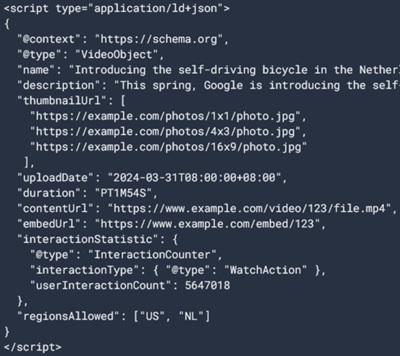
Pro tip: Embedding videos also encourages backlinks and social sharing — both powerful signals for SEO rankings.
4. Video and user experience
Video enhances user experience (UX) by making your website more engaging, informative and memorable. A well-placed video can keep visitors on your site longer, reduce bounce rates and encourage conversions — all of which are positive signals for SEO.
To make the most of video from a UX perspective, ensure your content:
- Loads quickly and doesn’t slow down your site
- Scales properly on all screen sizes, especially mobile
- Includes strong visuals, a clear message and a concise CTA
- Matches your brand tone and aligns with the page goal
Pro tip: Include a clear call-to-action within or after the video to guide the next step.
5. ADA compliance for video
Making your videos accessible isn’t just good practice — it’s often a legal requirement under the Americans with Disabilities Act (ADA). More importantly, accessible video content creates a more inclusive experience for all users while boosting your SEO performance.
Here’s how to ensure your video content is ADA compliant:
- Add captions: Captions support users who are deaf or hard of hearing and help others in sound-off environments. They also contribute to keyword visibility.
- Provide transcripts: A transcript makes your video searchable by both users and search engines, offering a readable alternative that boosts SEO and accessibility.
- Include audio descriptions: These narrate important visual content for blind or visually impaired users, especially important in videos where visuals aren’t explained through dialogue.
- Use accessible video players: Choose platforms like YouTube, Wistia or Vimeo, that support screen readers and full keyboard navigation, ensuring all video controls are operable without a mouse.
Pro tip: Avoid relying on auto-generated captions. Edit them for accuracy and formatting to ensure true compliance.
6. Video tools that make creation easy
You don’t need a full production team to create effective, professional-looking video content. Plenty of tools make planning, editing and publishing simple and cost-effective.
Popular options:
- Loom: Quick screen shares and explainers
- Adobe Express/Canva: Branded animations and short clips
- Descript/CapCut: Easy editing and captioning
- YouTube/Vimeo/Wistia: Hosting and performance tracking
- Vidyard: Marketing-focused video delivery and analytics
Pro tip: Compress video files before embedding to protect site speed and user experience.
Video isn’t just an enhancement it’s an engagement engine. When used strategically, it transforms your website into a more dynamic, interactive and conversion-focused experience. From storytelling and demos to testimonials and tutorials, video helps your visitors connect and take action.
At Flying Orange, we design and maintain websites that perform beautifully and deliver results. Whether you’re ready to add video to your existing site or want a fresh design that brings your brand to life, our team can help you make it happen. Contact us to start your next web project today.